Asset Index — System Breakdown Structure (SBS)
The System Breakdown Structure (SBS) organizes digital twin assets according to their operational, mechanical, electrical, and plumbing (MEP) systems (for example: Facility System Root → Physical System → System Member Asset).
While the Location Breakdown Structure (LBS) organizes elements by physical containment, SBS groups assets by functional connectedness (such as lighting circuits, HVAC duct networks, fire protection loops, or domestic water distribution).
SBS Architecture and Schema Relationships
System breakdowns are constructed by linking top-level system elements to physical member assets through relationship classes and aspect identities.

Key SBS Components
| Parameter | Default Schema Class / Property | Description |
|---|---|---|
systemClass |
bis.PhysicalSystem |
Target ECClass representing physical system containers. |
membershipClass |
bis.PhysicalSystemGroupsMembers |
Relationship ECClass grouping member elements under a system. |
assetIdentityClass |
IFCDynamic:ifcAspect_Identity_Data |
Metadata aspect class holding asset identity parameters. |
systemIdProperty |
ECInstanceId / UserLabel |
Property identifying the physical system. |
assetIdProperty |
TargetECInstanceId / Element.Id |
Pointer property linking member assets to the system. |
Configuring the System Breakdown
In Section 3 of the Unified Asset Configuration Builder:
- Enable System Breakdown: Ensure the System (SBS) toggle is set to active.
- Physical System ECClass: Enter the ECClass representing systems (e.g.
bis.PhysicalSystemorIFCDynamic:IfcDistributionSystem). - System Member Relationship Class: Specify the relationship class linking systems to elements (e.g.
bis.PhysicalSystemGroupsMembersorbis.ElementGroupsMembers). - Asset Identity Aspect Class: Optional aspect class containing identity metadata (e.g.
IFCDynamic:ifcAspect_Identity_Data).
System Membership ECSQL Pipeline
The SBS pipeline executes two queries to construct the system breakdown hierarchy:
Query 1: Extract Physical Systems
SELECT sys.ECInstanceId AS systemId,
       ec_classname(sys.ECClassId) AS className,
       sys.UserLabel AS label
FROM bis.PhysicalSystem sys
Query 2: Extract System Memberships
SELECT mem.SourceECInstanceId AS systemId,
       mem.TargetECInstanceId AS memberAssetId
FROM bis.PhysicalSystemGroupsMembers mem
Federated IFC Anomaly Rules & Multi-System Membership
In multi-model digital twins and federated IFC files, an asset may mistakenly be assigned to multiple physical systems across different design discipline files.
The SBS breakdown engine automatically evaluates multi-system assignments against your configured validation rules:
Multi-System Anomaly Detection
flagMultipleParents: When enabled, the engine checks if a single physical asset (ECInstanceIdorUAID) belongs to more than onebis.PhysicalSystem.flagDuplicateFederatedDefinitions: Flags instances where an asset is defined in multiple system models across federated IFC files.
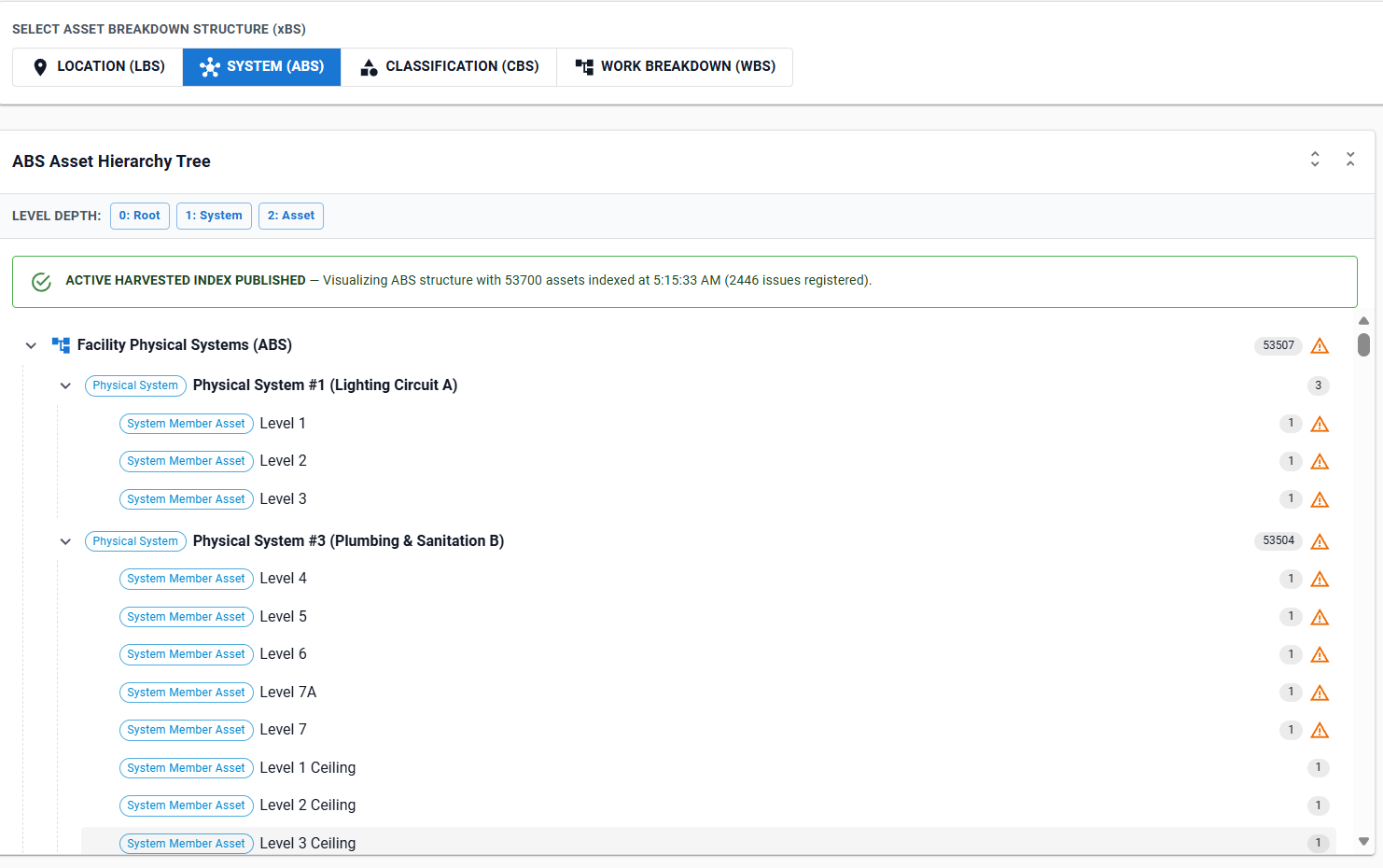
[!WARNING] Assets assigned to multiple systems are marked in the tree with a Federated IFC Multi-Definition warning badge and registered in the Data Quality & Issues Register for remediation.
System Hierarchy Preview
Use the iModel Console within the SBS builder section to preview the system breakdown structure:
- System Nodes: Displays system name (e.g.
Physical System #1 (Lighting Circuit A)), class name, and total member count. - Member Asset Nodes: Lists member asset tags, aspect IDs, and system relationship pointers.
Troubleshooting
| Symptom | Cause / Remedy |
|---|---|
| SBS Tree displays no system nodes | The target systemClass (e.g. bis.PhysicalSystem) is not present in the selected iModel. Open the iModel Console to verify system class names. |
| Systems exist but have 0 member assets | The membershipClass (e.g. bis.PhysicalSystemGroupsMembers) does not match the relationship class used in the CAD/BIM authoring tool. |
Member assets show Duplicate Federated Definition warnings |
The asset exists in multiple discipline models (e.g. Electrical and Architectural). Resolve multi-definition links in the design tool or review the Quality Register. |