Asset Index — Harvesting Engine & Data Extraction
The Harvesting Engine executes data extraction, spatial tier resolution, system membership joining, classification parsing, and quality issue registration across digital twin iModels.
Harvesting processes raw iModel element records according to your active Unified Asset Configuration, producing normalized asset records, multi-breakdown trees (LBS, SBS, CBS, WBS), and a federated data quality register.
Harvesting Execution Modes
The engine supports two execution targets:
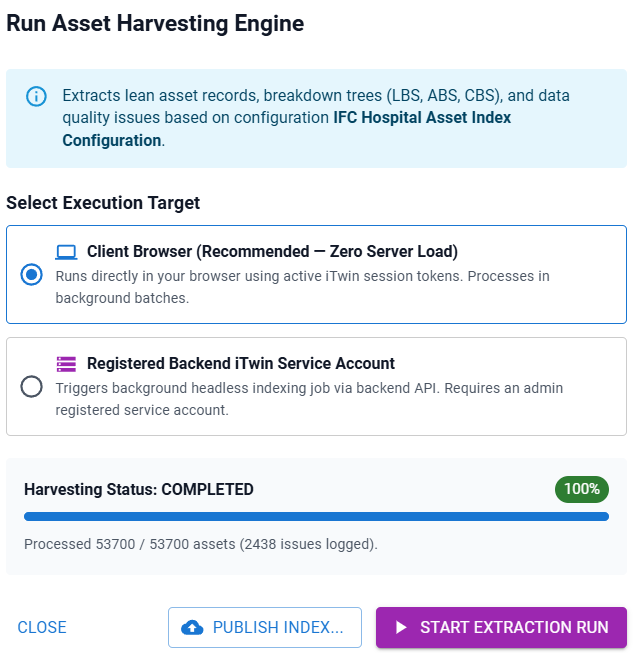
1. Client Browser Mode (CLIENT_BROWSER) — Recommended
- Zero Server Load: Executes directly in the user's web browser using active Bentley iTwin user session tokens.
- Client Batch Processing: Queries and processes elements in asynchronous batches to prevent browser UI freeze.
- Immediate Visualization: Extracted breakdown trees are available immediately for interactive browsing without backend database dependencies.
2. Registered Backend Service Mode (BACKEND_SERVICE)
- Headless Execution: Triggers a background indexing job via the backend database service.
- Admin iTwin Service Client: Requires a registered iTwin Service Account Client ID (
spa-xxxxxxxx-xxxx-xxxx-xxxx). - Automated Scheduling: Ideal for automated CI/CD pipeline triggers and scheduled nightly harvesting runs. NOTE : We have no backend service enabled so far, if you think this would be a nice feature, then please register your interest, but you iwll need to register an iTwin Service Account with your project.
Performance & Batch Chunking
To ensure high performance across large digital twin models containing hundreds of thousands of elements, harvesting utilizes configurable chunking parameters:
chunkSize: Default batch size (e.g.500records per chunk).- Progress Tracking: Real-time modal progress updates display processed asset counts, total assets, current chunk index, issue counts, and execution duration.
Unified Data Validation Rules
During extraction, every physical element and relationship node is evaluated against unified data quality rules:
| Validation Rule | Config Parameter | Severity | Description |
|---|---|---|---|
| Orphan Spatial Level | flagOrphanLevels |
WARNING / INFO |
Space element missing a parent storey reference, or physical asset missing a space pointer. |
| Blank Identifiers | flagBlankIdentifiers |
WARNING |
Element has an empty or null UserLabel or canonical unique identifier (UAID). |
| Multiple System Parents | flagMultipleParents |
WARNING |
Physical asset linked to multiple bis.PhysicalSystem containers. |
| Placeholder Values | flagPlaceholders |
WARNING |
Asset tag or code matches disallowed placeholder strings (TBC, TBD, N/A, TEMP). |
| Duplicate Federated Definitions | flagDuplicateFederatedDefinitions |
WARNING |
Asset defined in multiple discipline models across federated IFC files. |
Extracted anomalies are compiled into the Data Quality & Federated Issues Register with target element instance IDs, ECClasses, issue types, and status tracking (OPEN, IN_REVIEW, RESOLVED, IGNORED).
Cost Pause & Index Publication
Publishing harvested results commits extracted breakdown structures and asset records to central PostgreSQL storage and updates materialized ltree spatial path indexes.
Because central publishing incurs backend database storage and compute operations, the application enforces an explicit Cost Pause & Entitlement Confirmation:
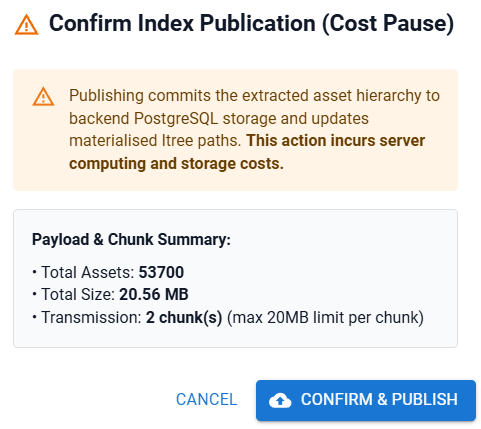
Publication Requirements
- Publish Entitlement: You must possess the Publish or Publisher entitlement in your user license context. If missing, the Publish Index button is disabled with an explanatory tooltip.
- Payload Size Calculation: Displays exact payload size in megabytes (e.g.
14.25 MB) and transmission chunk count. - 20MB Payload Chunking: Large result payloads are split into 20MB transmission chunks to guarantee reliable network transmission over HTTP APIs.
- Confirmation: Select Confirm & Publish to transmit chunks and commit results to the digital twin reporting database. As with most cloud capabilities, unfortunately when we start to produce industrial scale applications and secure storage, they all come at a slight cost. Please help us to ensure we can afford to deliver our applications at a reasonable cost for everyone.
Step-by-Step Harvesting Workflow
- Select Run Asset Harvesting Engine from the Browse or Configure tab.
- Choose your Execution Target (
Client BrowserorRegistered Backend iTwin Service Account). - Select Start Extraction Run.
- Monitor extraction progress (
Harvesting Status: RUNNING, processed assets, issues logged). - Once completed (
Harvesting Status: COMPLETED), review the generated LBS, SBS, CBS, and WBS breakdown trees. - Select Publish Index..., inspect the payload summary in the Cost Pause modal, and select Confirm & Publish.
Troubleshooting
| Symptom | Cause / Remedy |
|---|---|
| Harvesting fails with network error | Client session token expired. Refresh the browser page to renew your Bentley iTwin API authentication. |
| Publish Index button is disabled | Confirm that your user license includes the Publish entitlement. |
| Extraction is slow on large iModels | Reduce the chunkSize in harvesting settings (e.g. from 1000 to 300) to optimize browser memory management. |