Asset Index — Location Breakdown Structure (LBS)
The Location Breakdown Structure (LBS) defines the physical spatial hierarchy of digital twin assets. It enables project teams, facility managers, and information managers to navigate assets based on geographic and spatial containment (for example: Site / Facility → Storey / Level → Space / Room → Physical Component).
Spatial Tier Architecture
An LBS configuration is composed of ordered spatial levels. Each level specifies a target ECClass, identification property mappings, parent relationship rules, and optional filter criteria.

Standard 4-Tier LBS Hierarchy
| Level Index | Level Name | Typical Target ECClass | Purpose |
|---|---|---|---|
| Level -1 / 0 | Site / Facility | bis.Subject, IFCDynamic:IfcSite, IFCDynamic:IfcBuilding |
Top-level facility container or site footprint. |
| Level 1 | Storey / Level | spatial.Story, IFCDynamic:IfcBuildingStorey |
Vertical floor level or elevation tier. |
| Level 2 | Space / Room | spatial.Space, IFCDynamic:IfcSpace |
Functional room, corridor, shaft, or zone. |
| Level 3 | Physical Component | bis.GeometricElement3d, bis.PhysicalElement |
Individual physical asset (e.g. Pump, Valve, Light Fitting, Air Handling Unit). |
Defining LBS Levels
For each level in the LBS pipeline, configure the following parameters:
1. Display Name & Target ECClass
- Level Display Name: Human-readable tier label (e.g.
Storey / Level). - Target ECClass: Full schema class name to query (e.g.
spatial.StoryorIFCDynamic:IfcBuildingStorey).
2. Identification Properties
labelProperty: Property supplying the level name (e.g.UserLabel,CodeValue,ifcMark).blankHandling: Controls behavior when an element's label property is null or empty:FLAG_ISSUE_AND_FALLBACK: Generates a fallback identifier (e.g.[UNNAMED_SPACE_0x200000016c4]) and registers a validation issue.FLAG_ISSUE_AND_SKIP: Skips the element from the spatial tree and logs a validation issue.ALLOW_BLANK: Retains null/blank values without raising an issue.
fallbackPrefix: Prefix text applied when generating fallback identifiers (e.g.UNNAMED_LEVEL).
Parent Relationship Rules
Connecting lower-level spatial nodes (such as spaces or physical assets) to their parent container (such as storeys or buildings) is configured using one of three relationship strategies:
1. Navigation Property (NAVIGATION_PROPERTY)
Uses a direct pointer property on the child element referencing its parent's ECInstanceId.
navigationProperty: Navigation property path (e.g.ComposingElement.IdorModel.Id).- Use case: Standard iModel spatial containment structures where storey elements directly reference their parent building.
SELECT st.ECInstanceId AS id,
       ec_classname(st.ECClassId) AS className,
       st.UserLabel AS label,
       st.ComposingElement.Id AS parentId
FROM spatial.Story st
2. Relationship Class (RELATIONSHIP_CLASS)
Queries an intermediate relationship class joining parent and child elements.
relationshipClass: Full schema name of the relationship class (e.g.SpatialComposition:CompositeOverlapsSpatialElementsorbis.ElementOwnsChildElements).sourceEndpoint: End of the relationship pointing to the parent (SourceECInstanceIdorTargetECInstanceId).targetEndpoint: End of the relationship pointing to the child.- Use case: Complex IFC spatial compositions or composite space relationships.
SELECT rel.ECInstanceId AS id,
       rel.SourceECInstanceId AS parentId,
       rel.TargetECInstanceId AS targetId,
       tar.UserLabel AS label
FROM SpatialComposition:CompositeOverlapsSpatialElements rel
JOIN bis.Element tar ON tar.ECInstanceId = rel.TargetECInstanceId
3. Spatial Overlap Bounding Box (SPATIAL_OVERLAP)
When explicit relationship classes or navigation properties are missing in design models, the engine falls back to 3D bounding box spatial intersection:
- Compares the 3D range box (
Placement.Organd bounding dimensions) of physical elements against space geometries. - Automatically assigns physical components to the space containing their centroid.
Optional Filter Clauses
Use ECSQL WHERE filter clauses to restrict which elements are included at a given spatial level:
- Example filter:
UserLabel IS NOT NULL AND IsPrivate = FALSE - Allows exclusion of temporary construction spaces or staging objects from official LBS reporting.
Hierarchy Testing & Preview
Select Test Spatial Config & Preview Tree to execute a sample extraction against the current iModel:
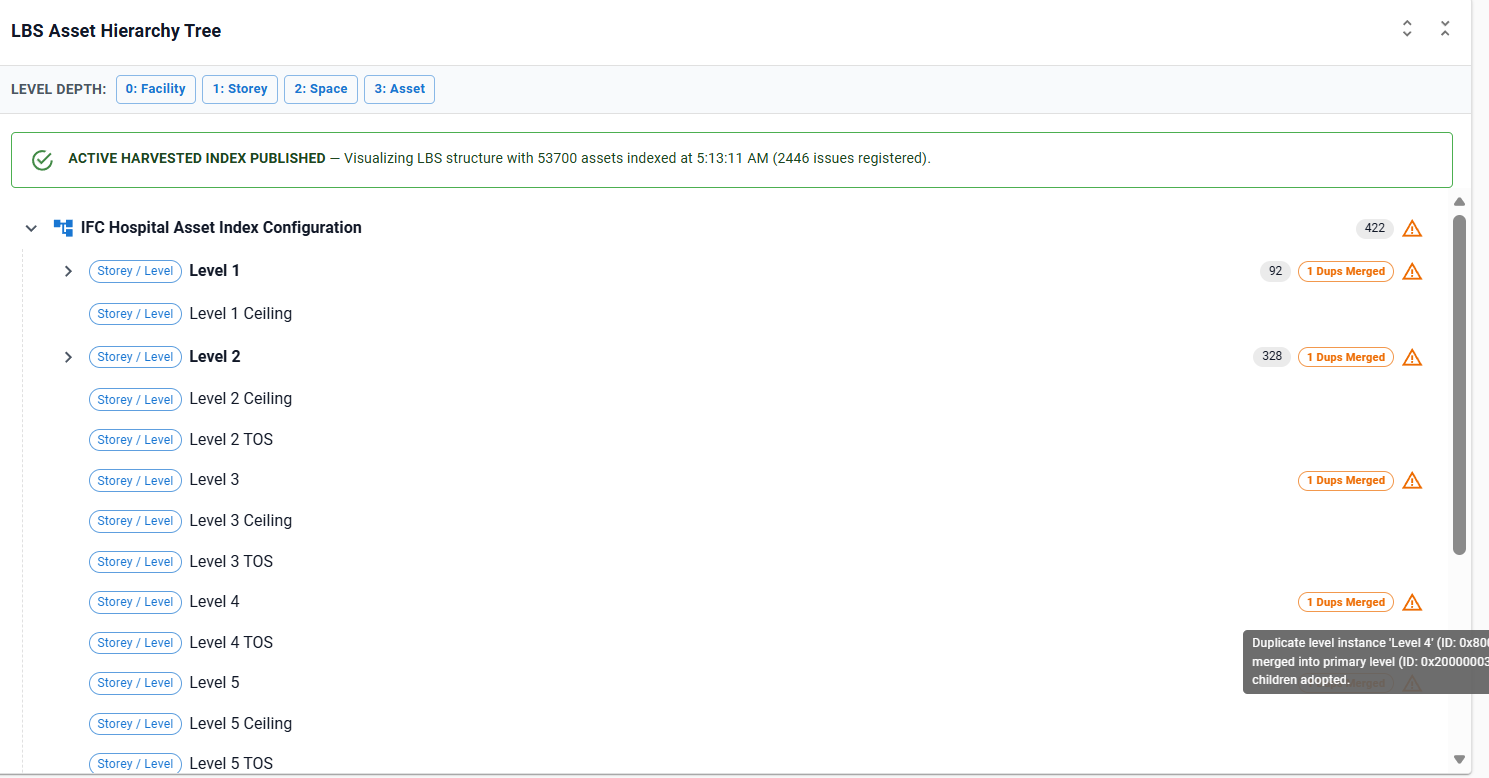
- Duration & Execution Time: Displays query execution time in milliseconds.
- Level Match Metrics: Summarizes total elements matched, sample node count, blank identifier count, and orphan count for each level index.
- Interactive Preview Tree: Displays a expandable sample hierarchy tree rendering resolved names, instance IDs, and parent pointers.
- Validation Warnings: Lists configuration issues (e.g. missing parent navigation properties or unmapped classes).
Troubleshooting
| Symptom | Cause / Check |
|---|---|
Assets appear under [Orphan Assets] |
Physical elements lack a parent space or storey reference. Verify that the parent relationship type (NAVIGATION_PROPERTY vs RELATIONSHIP_CLASS) matches your iModel schema. |
| Duplicate storey nodes appear | Multiple building storey elements exist with identical names across federated IFC models. The LBS tree engine automatically merges duplicate levels and marks them with the Dups Merged badge. |
Level names display as [UNNAMED_LEVEL_0x...] |
The configured labelProperty (e.g. UserLabel) is null or blank on that spatial element. Check the authoring CAD/BIM model or adjust blankHandling. |