Asset Index — Browse Asset Hierarchy & Multi-Breakdown Tree Engine
The Browse Asset Hierarchy view is the primary user interface of the Asset Index application. It provides interactive, multi-dimensional tree navigation, real-time search, tree depth controls, node metadata inspection, 3D viewer synchronization, and an integrated Data Quality Register.
Page Layout and Main Navigation Tabs
The Asset Index page is organized into three primary operational tabs:

- Browse Asset Hierarchy (Primary UI): Interactive xBS breakdown tree browser, search, node details inspector, and 3D viewer integration.
- Configure Asset Index (Single Builder): Administrative configuration builder for LBS, SBS, CBS, WBS, validation rules, and iModel Console.
- Data Quality & Issues Register: Central tabular view of all registered quality anomalies and federated model issues.
Multi-Breakdown Structure Switcher (xBS)
Use the breakdown structure toggle group in the upper control panel to switch navigation trees instantly:
| Breakdown Mode | Button Label | Icon | Primary Navigation Dimension |
|---|---|---|---|
| LBS | Location (LBS) |
Location Marker | Spatial containment (Facility → Storey → Space → Physical Asset). |
| SBS | System (SBS) |
Hub / Network | Operational MEP systems (Physical System → System Member Asset). |
| CBS | Classification (CBS) |
Category | Taxonomy standards (Uniclass 2015, OmniClass Table 23, COBie). |
| WBS | Work Breakdown (WBS) |
Tree Node | Construction work packages and contract packaging. |
Search & Debounced Filtering
The search controller enables instant filtering across large tree structures:
- Debounced Search Input: Enter asset tags, room names, classification codes, ECClasses, or ECInstanceIds into the search box. Updates are debounced by 250ms to prevent UI lag.
- Auto-Expanding Ancestor Nodes: When a search query matches a child node, all ancestor nodes in the hierarchy auto-expand so the matching element is highlighted in context.
- Match Count Badge: Displays the total number of matching nodes found (e.g.
14 Matches Found). - Clear Search: Select × in the search box to reset filtering.
Tree Expansion and Depth Jumpers
Use the tree expansion control bar to navigate deep hierarchies efficiently:
- Expand All: Expands all nodes across all depth tiers.
- Collapse All: Collapses the tree back to root nodes.
- Level Depth Jumpers: Select specific depth tiers (e.g.
0: Facility,1: Storey,2: Space,3: Asset) to expand the tree to that exact depth index.
Rich Tree Node Badges
Tree nodes display informative status chips and visual badges:
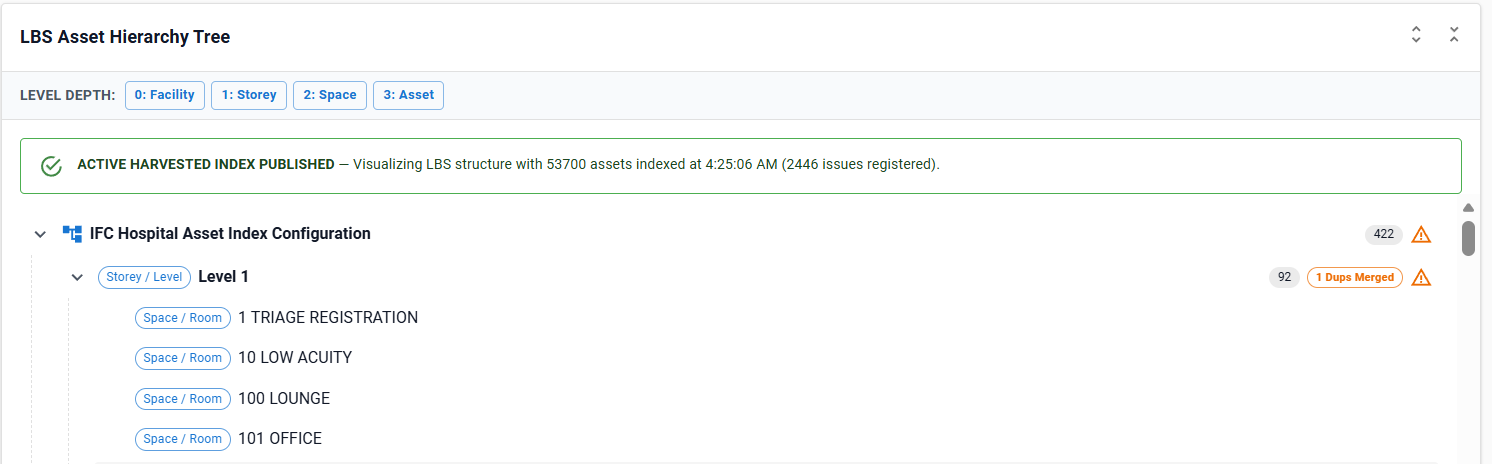
| Badge | Color / Variant | Meaning |
|---|---|---|
| Level Chip | Colored Outlined (Storey / Level, Space / Room) |
Indicates the spatial tier or taxonomy depth index of the node. |
| Asset Count | Filled Grey (14) |
Total count of physical assets contained within that subtree. |
| Dups Merged | Warning Orange (4 Dups Merged) |
Indicates that duplicate spatial level instances (e.g. multiple Parking storeys across IFC files) were automatically merged into this primary node. |
| Multi-iModel | Secondary Purple (Multi-iModel (3)) |
Asset exists in 3 different iModels across the iTwin project. |
| Placeholder ID | Warning Filled (Placeholder ID) |
Asset identifier or tag is TBC, TBD, TEMP, or blank. |
| External iModel | Default Outlined (External iModel) |
Asset belongs to a non-loaded iModel within the federated iTwin container. |
| Adopted Child | Info Outlined (Adopted (0x30000000609)) |
Child element was adopted from a duplicate parent node during hierarchy normalization. |
| Quality Warning | Warning Icon | Hovering displays the exact quality issue message (e.g. UserLabel is empty on Sink element). |
Selected Node Inspection Panel & 3D Viewer Sync
Selecting any tree node opens the Asset Inspection Panel:
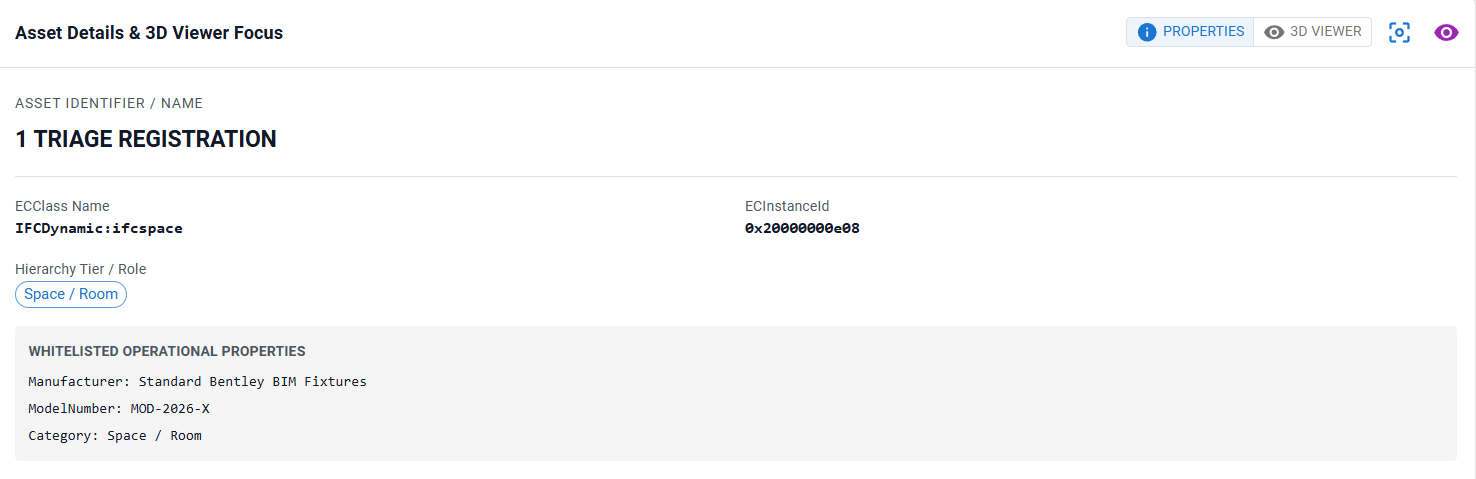
Inspection Panel Features
- Asset Identity: Displays resolved display name, ECClassName, ECInstanceId, and canonical unique identifier (
UAID). - Location Path: Breadcrumb trail rendering full spatial path (e.g.
Building A / Level 1 / 148 ICU ROOM). - Multi-iModel Links: Interactive links listing every iModel file where the asset occurs across the digital twin.
- Merged Duplicate Records: Details duplicate instances merged during extraction.
- 3D Viewport Zoom-to-Fit: Select Zoom to Asset in 3D to focus the active iTwin 3D Viewport camera directly on the selected asset geometry.
- Property Inspection Grid: Tabular view of all whitelisted property key-value pairs stored for the asset.
Data Quality & Federated Issues Register
Data Quality provides a central dashboard for inspecting and managing asset data quality anomalies:
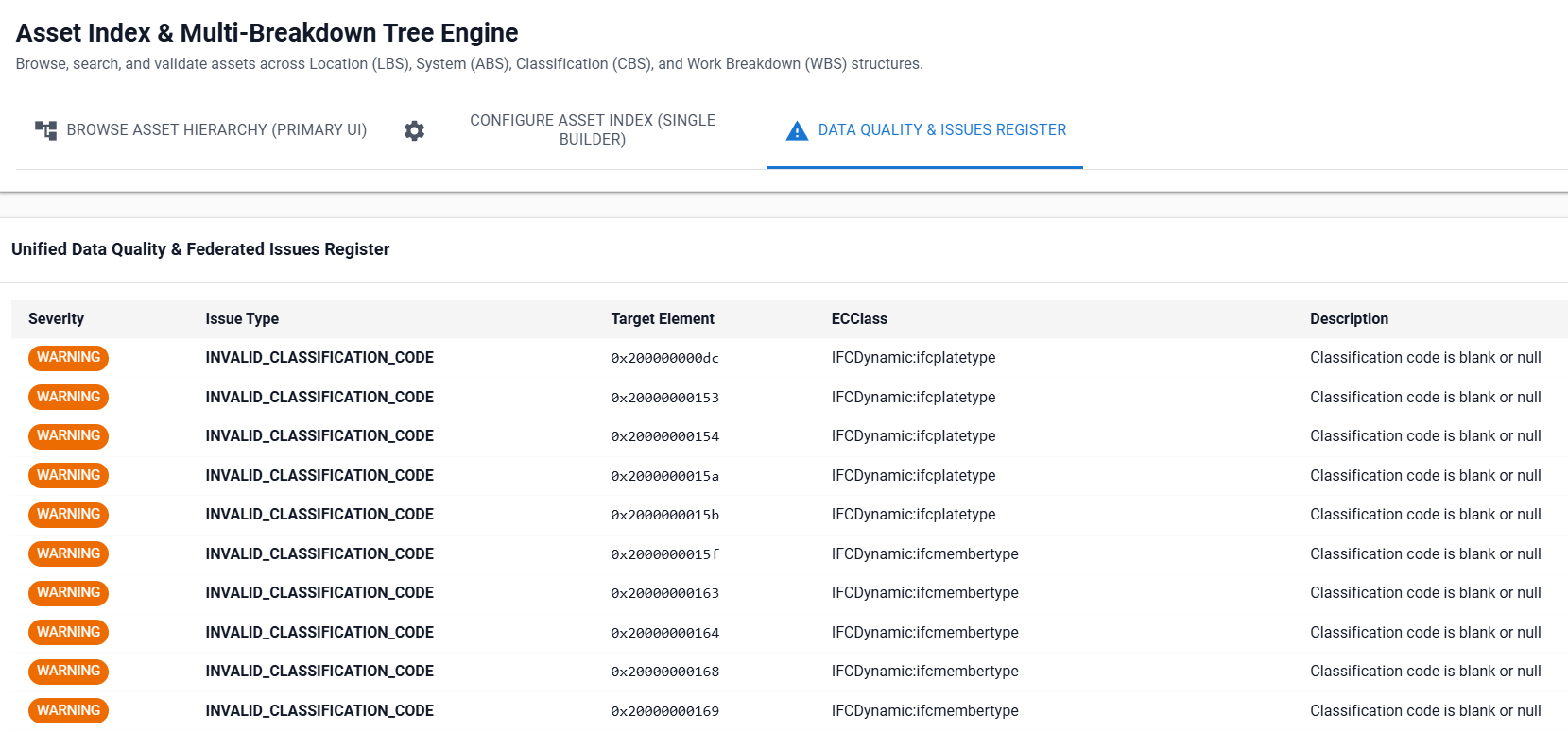
Issues Register Columns
- Severity:
CRITICAL(Red),WARNING(Orange), orINFO(Blue). - Issue Type: Standardized issue code (
REQUIRED_BUT_BLANK,DUPLICATE_FEDERATED_DEFINITION,ORPHAN_LOCATION,PLACEHOLDER_IDENTIFIER). - Target Element: ECInstanceId of the failing element (formatted in monospace).
- ECClass: Schema class name of the target element.
- Description: Detailed error narrative explaining the compliance failure.
- Status: Workflow state chip (
OPEN,IN_REVIEW,RESOLVED,IGNORED).
Troubleshooting
| Symptom | Cause / Remedy |
|---|---|
| Tree displays sample demo data | No harvesting run has been executed for the current configuration. Select Run Asset Harvesting Engine to extract live data. |
| Zoom to Asset in 3D is disabled | The selected node is an abstract space/category or belongs to an iModel not currently loaded in the 3D viewport canvas. |
| Search returns 0 results | Clear search text, verify spelling, or switch to the relevant xBS breakdown structure (e.g. searching for a classification code while in LBS mode). |