Asset Index — Classification Breakdown Structure (CBS)
The Classification Breakdown Structure (CBS) categorizes digital twin assets according to industry-standard or custom classification taxonomies (for example: Uniclass 2015, OmniClass Table 23, COBie, or project-specific classification systems).
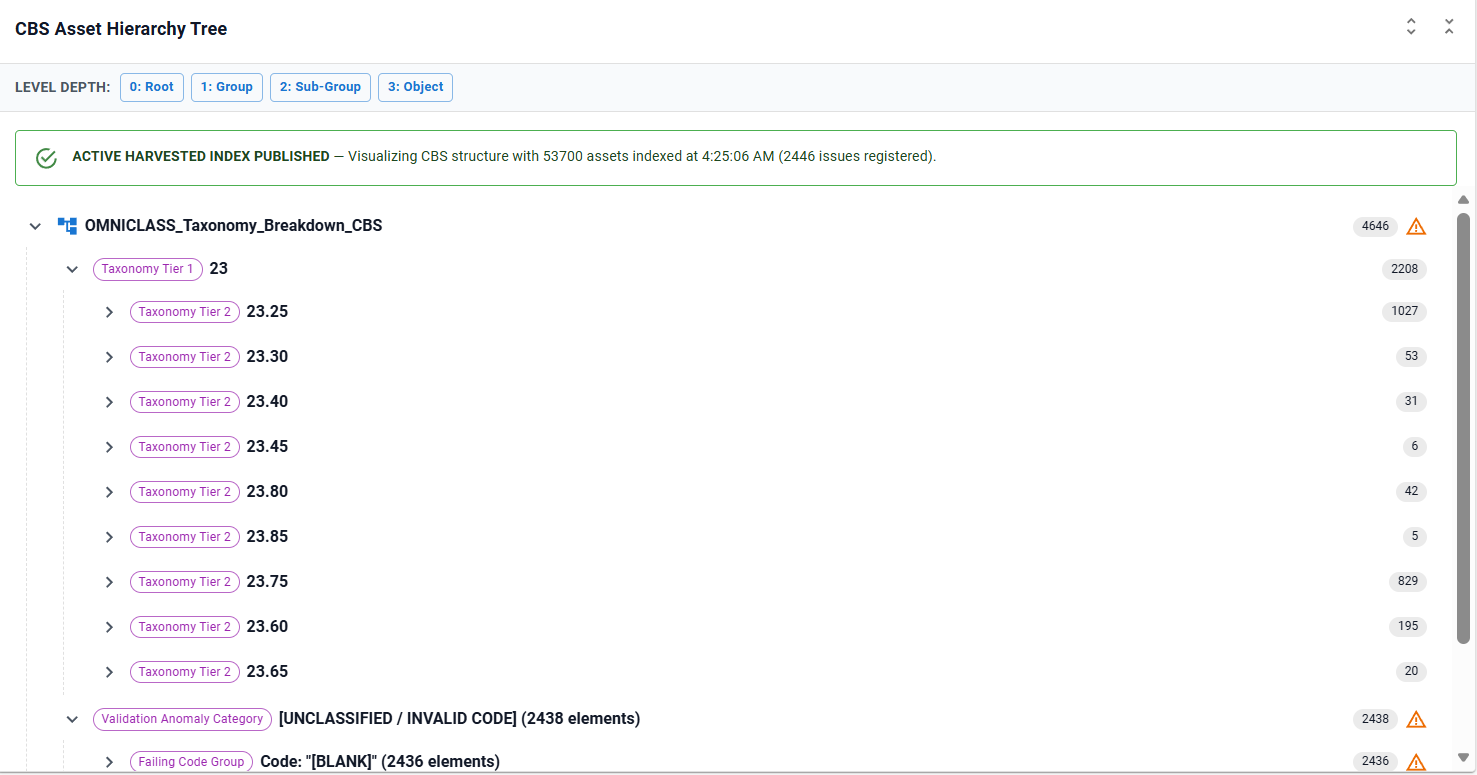
CBS tree navigation enables information managers and cost consultants to inspect elements grouped by classification code depth (e.g., 23.80 Electric Power → 23.80.70 Lighting → 23.80.70.11 Luminaires → Downlights).
Supported Classification Taxonomies
The CBS engine natively supports the following classification standards:
| Classification Standard | Code Format Example | Section Delimiter | Sample Code Pattern |
|---|---|---|---|
| Uniclass 2015 | Pr_60_65_21_22 |
Underscore (_) |
^[A-Za-z]{2}_\d{2}(_\d{2}){1,5}$ |
| OmniClass Table 23 | 23.80.70.11.14 |
Dot (.) |
^[0-9]{2}(\.[0-9]{2}){1,5}$ |
| COBie Classification | 23.80.70.11 |
Dot (.) |
Standard COBie category codes |
| Custom Taxonomy | User-defined | Dot (.) or Underscore (_) |
Custom regex string |

Configuring CBS Parameters
In Section 4 of the Unified Asset Configuration Builder:
1. Classification Standard
Select Uniclass 2015, OmniClass Table 23, or COBie. Selecting a standard automatically configures the recommended 2-Digit Section Delimiter and Code Validation Regex Pattern. You may see other configurations which are enabled for specific projects. If the current configurations do not meet your specific requests then raise a feature request. Currently configurations are not user configurable.
2. Section Delimiter
Defines how taxonomy levels are parsed into tree depth:
- Underscore (
_): Parses Uniclass codes likePr_60_65_21into Group (Pr), Sub-Group (60), Section (65), Object (21). - Dot (
.): Parses OmniClass codes like23.80.70.11into 2-digit pairs (23→23.80→23.80.70→23.80.70.11).
3. Target Aspect Class & Properties
targetAspectClass: Aspect class hosting classification parameters (e.g.IFCDynamic.ifcAspect_PSET_EIR_ParametersorIFCDynamic:ifcAspect_Identity_Data).labelPropertyName: Asset label/identifier property on the aspect (e.g.ifcAssetId,UserLabel,CodeValue).propertyNames: Classification code properties evaluated in order of preference (e.g.ifcAssetClass,Uniclass2015,ifcOmniClass_Number).
ECSQL Classification Strategies
The CBS engine utilizes three alternative ECSQL extraction strategies depending on how classification data is modeled in your iModel schema:
Strategy 1: Aspect Class Join (Recommended)
Joins the target aspect class with bis.Element to retrieve classification codes and asset labels:
SELECT aspect.Element.Id AS elementId,
       aspect.ifcAssetClass AS classificationCode,
       aspect.ifcuaid AS label,
       ec_classname(e.ECClassId) AS className
FROM IFCDynamic.ifcAspect_PSET_HS2_Parameters AS aspect
JOIN bis.Element e ON e.ECInstanceId = aspect.Element.Id
WHERE aspect.ifcAssetClass IS NOT NULL
Strategy 2: ElementMultiAspect JSON Extraction ($->property)
Extracts classification properties stored as dynamic JSON metadata within bis.ElementMultiAspect:
SELECT aspect.id AS elementId,
       classificationCode,
       aspect.ifcuaid AS label,
       ec_classname(e.ECClassId) AS className
FROM (
  SELECT $->ifcAssetClass AS classificationCode,
         $->ifcuaid AS label,
         Element.Id AS id
  FROM bis.ElementMultiAspect
) AS aspect
JOIN bis.Element e ON e.ECInstanceId = aspect.id
WHERE aspect.classificationCode IS NOT NULL
Strategy 3: Direct Element Property Query
Queries classification code properties directly from bis.Element:
SELECT e.ECInstanceId AS elementId,
       e.ifcAssetClass AS classificationCode,
       e.UserLabel AS label,
       ec_classname(e.ECClassId) AS className
FROM bis.Element e
WHERE e.ifcAssetClass IS NOT NULL
Code Parsing and Taxonomy Tree Construction
During harvesting, raw classification strings are validated and expanded into a multi-tiered taxonomy tree:
- Format Validation: Codes are checked against the regex pattern. Invalid or non-conforming strings (e.g.
TBC,N/A,TEMP) are filtered out and registered as validation issues. - 2-Digit Parsing: The code is split using the section delimiter into 2-digit pairs.
- Node Hierarchy:
23— Electric Power and Lighting (Group Level)23.80— Electric Power (Sub-Group Level)23.80.70— Lighting (Section Level)23.80.70.11— Luminaires for Internal Lighting (Object Level)
- Asset Attachment: Elements are attached as leaf nodes under their exact classification code section.
Troubleshooting
| Symptom | Cause / Remedy |
|---|---|
| CBS tree is empty | The targetAspectClass or propertyNames specified in configuration do not match the iModel aspect schema. Use the iModel Console to inspect aspect class properties. |
Classification codes appear under [Unclassified Assets] |
Elements lack classification values, or codes failed regex validation (e.g. Pr-60-65 using hyphens instead of underscores). |
| Uniclass codes fail to expand hierarchy | Verify that the Section Delimiter is set to _ (Underscore) for Uniclass 2015. |