Fire Index — Browse Fire Hierarchy & 3D Viewport Engine
The Browse Fire Hierarchy view is the primary operational interface of the Fire Safety Index application. Built specifically for the UK Building Safety Act 2022 Golden Thread and BS 8644-1:2022 Digital Management of Fire Safety Information, it provides multi-lens tree navigation, instant search, compliance filtering, 3D thematic viewport synchronization, and deep inspection of fire protection assets.
Page Layout and Main Navigation Tabs
The Fire Index workspace is organized into three primary tabs:
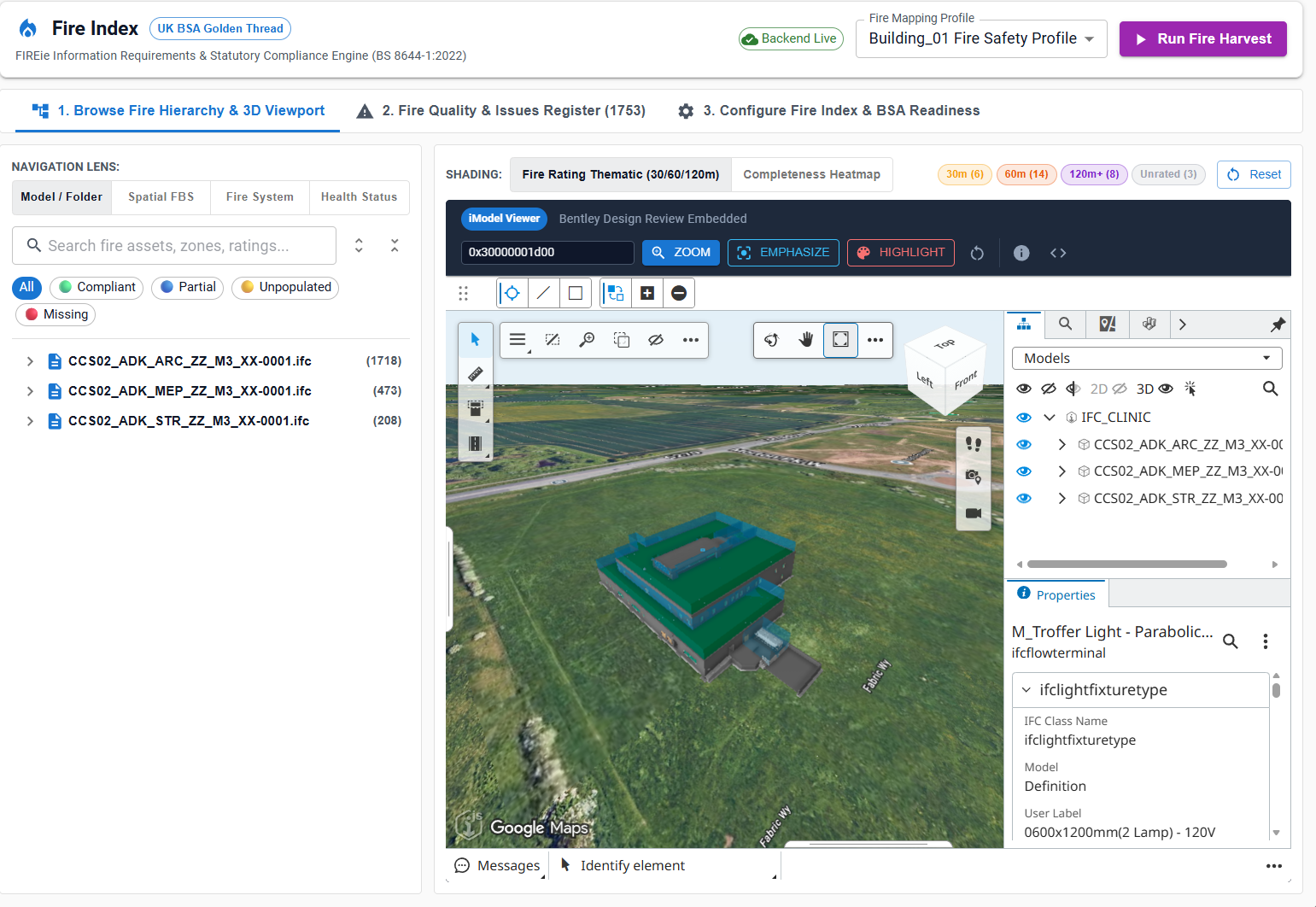
- 1. Browse Fire Hierarchy & 3D Viewport (Primary UI): Interactive multi-lens hierarchy tree browser, compliance chips, instant search, 3D thematic viewport, and slide-out asset inspection drawer.
- 2. Fire Quality & Issues Register: Statutory compliance issue tracking, anomaly categorization (
missing_fire_rating,invalid_fire_rating_format), and BCF issue raising. - 3. Configure Fire Index & BSA Readiness: Profile builder for mapping iModel ECSQL properties, setting gateway thresholds (
GW2/GW3), and defining BS/EN validation regex rules.
Multi-Lens Navigation Engine
The left-hand controller allows fire safety managers, BIM coordinators, and principal designers to view fire assets across four distinct organizational dimensions:
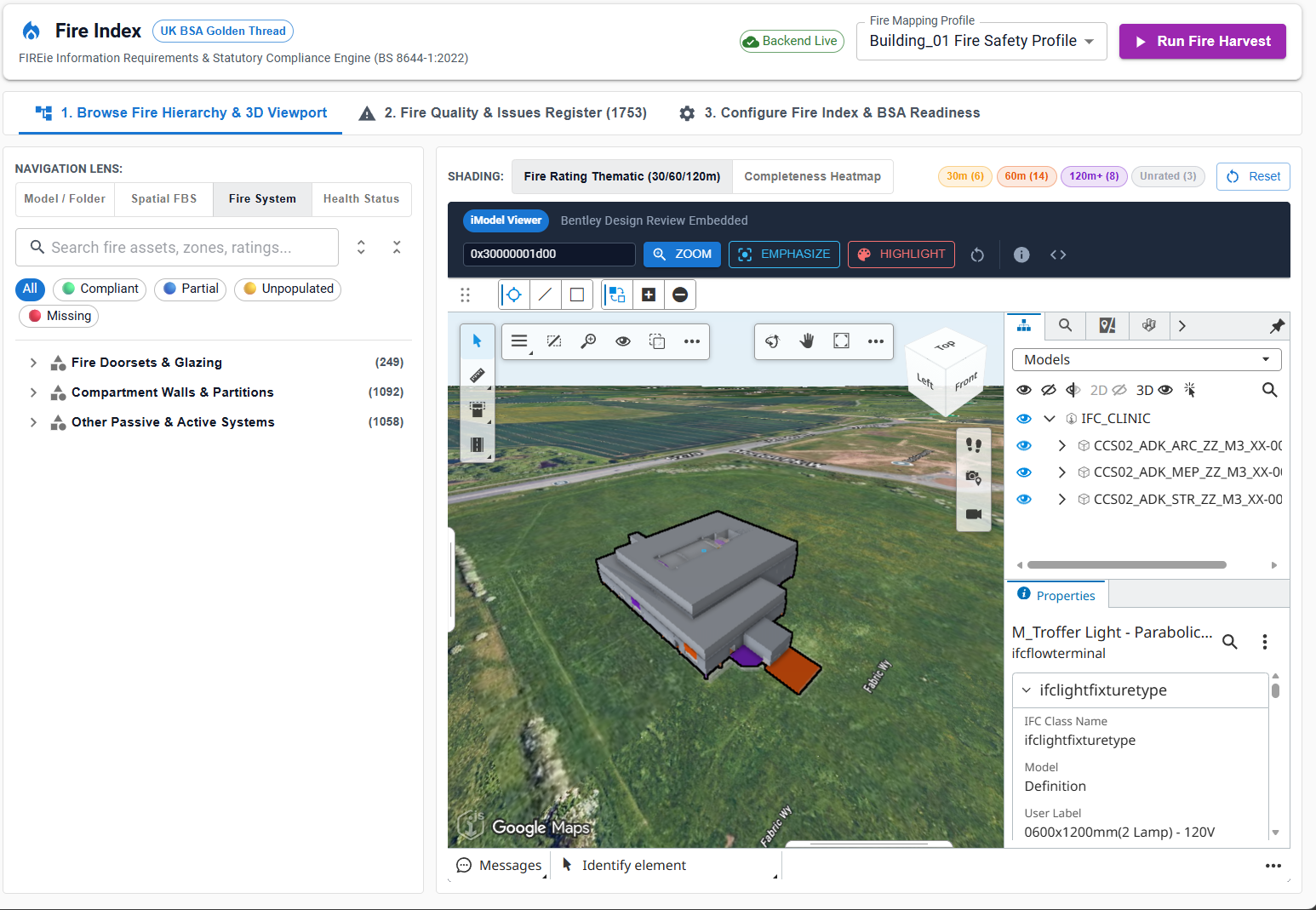
| Navigation Lens | Button Label | Core Hierarchy Dimension | Use Case |
|---|---|---|---|
| Model / Folder | Model / Folder |
Physical source files → Levels → Fire Elements | Cross-disciplinary coordination (e.g. verifying architectural doorsets against MEP dampers). |
| Spatial FBS | Spatial FBS |
Facility → Storey → Fire Compartment → Fire Component | Statutory compartmentation checks and safety boundary verification. |
| Fire System | Fire System |
System Classification (Doorsets, Partitions, Dampers, Extinguishers) | Verification by trade or fire protection work package. |
| Health Status | Health Status |
Statutory Compliance State (COMPLIANT, PARTIAL, MISSING) |
Rapid gap analysis prior to Gateway 2 or Gateway 3 submissions. |
Search & Health Status Filtering
The search and filter bar enables instant filtering across thousands of fire components:
- Debounced Search Input: Search by asset tag, unique identifier, room name, compartment code, ECClass, or fire rating (e.g.
FD60S,C-01-CORRIDOR,Doors_Single_Flush). - Health Filter Chips:
All: Displays all extracted fire components.COMPLIANT(Green): Assets with fully verified fire ratings meeting BS 8644-1 rules.PARTIAL(Blue): Assets with basic ratings but missing supporting Golden Thread provenance (e.g. certificate number or installer).UNPOPULATED(Orange): Fire assets where rating is placeholder or not recognized.MISSING(Red): Critical statutory failure — asset belongs to a fire-resisting class but has null/empty fire rating.
Rich Tree Node Badges & Status Chips
Tree nodes render real-time statutory metadata badges:
| Badge / Chip | Color / Variant | Meaning |
|---|---|---|
| Fire Rating | Outlined Blue (FD60S, 120min, EI 60) |
Approved fire resistance rating duration and smoke seal designation (S). |
| Storey Level | Filled Dark (Level 01 - Ground) |
Spatial storey containment. |
| Element Count | Badge Counter ((22), (18)) |
Number of fire assets contained within that branch. |
| Health Dot | Green / Yellow / Orange / Red | Visual compliance indicator for instant subtree scanning. |
Selected Node Inspection Drawer & Golden Thread Provenance
Selecting any fire asset opens the dedicated Fire Asset Inspection Drawer:

Inspection Drawer Capabilities:
- Header & Identification:
- Resolved display name, ECInstanceId (e.g.
0x4000000016b), source file, and ECClass (RevitDynamic.Doors_Single_Flush_FD60S). - Compliance status badge (
COMPLIANT), composite rating chip (FD60S / EI 60), and compartment zone (C-01-CORRIDOR).
- Resolved display name, ECInstanceId (e.g.
- Primary Actions:
- Zoom in 3D: Automatically drives the 3D camera to frame the element geometry, applying persistent isolation and visual emphasis.
- Raise Fire Issue: Direct trigger to log a statutory non-compliance issue or BCF topic for the active element.
- Multi-Tab Property Sections:
- Fire Strategy: Composite rating, Integrity (E minutes), Insulation (I minutes), Smoke Leakage (Sa), and Reaction to Fire (EN 13501-1 class).
- Spatial Compartmentation (FBS): Compartment ID, Compartment Boundary designation, and Protected Escape Route alignment.
- Provenance (Golden Thread): Manufacturer, Product code, Certifier body (e.g. FIRAS, BM TRADA, Certifire), Test Certificate Number, and Installation Contractor.
- Compliance: Rule audit trail detailing how the property matched the active statutory profile.
3D Viewport Synchronisation & Thematic Controls
The right-hand canvas embeds Bentley's high-performance 3D ConnectViewer:
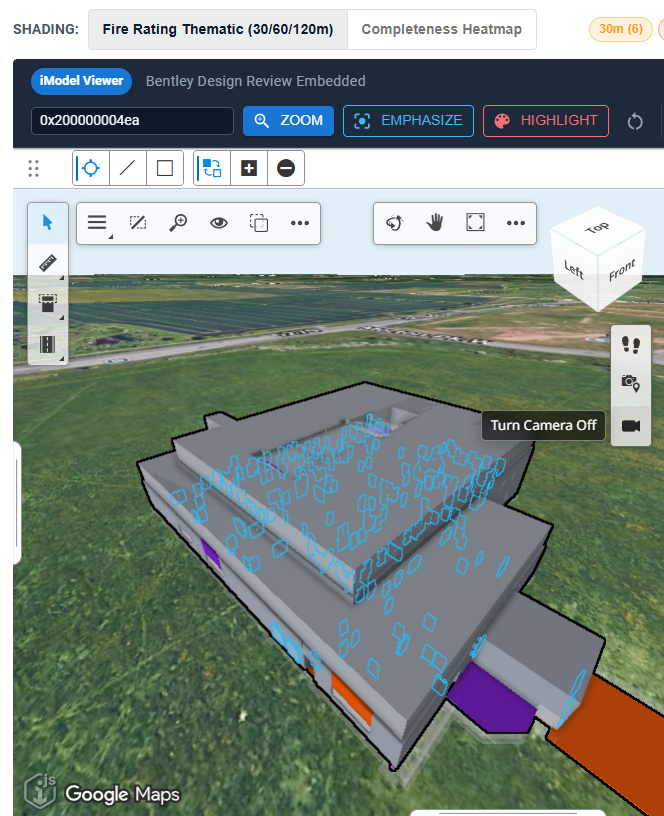
- Fire Rating Thematic Shading (30/60/120m): Color-codes physical components according to statutory fire resistance duration:
- 30 Minutes: Gold (
#FC4E2A) - 60 Minutes: Orange-Red (
#E31A1C) - 120+ Minutes: Deep Purple / Red (
#800026) - Unspecified / Unrated: Light Gray (
#D9D9D9)
- 30 Minutes: Gold (
- Completeness Heatmap: Colors elements by Golden Thread data readiness (
Green= Compliant,Red= Missing Data). - Element Quick Actions:
- Input ECInstanceId directly (e.g.
0x200000014a1). ZOOM: Center and frame element in camera.EMPHASIZE: Highlight element while ghosting surrounding architectural context.HIGHLIGHT: Pulse bounding box outline for easy location.
- Input ECInstanceId directly (e.g.
Troubleshooting
| Symptom | Probable Cause | Action |
|---|---|---|
| Tree displays empty or only default nodes | No harvest run has been completed for this iModel. | Select Run Fire Harvest to execute live ECSQL extraction. |
| Zoom in 3D does not move camera | Element belongs to an iModel not loaded, or element has non-geometric data. | Check the iModel link in the header and verify element geometry exists. |
Asset shows Missing Rating |
The source property exists but value is null/empty. | Raise an issue or update the authoring model (Revit/IFC) with the required rating. |