Fire Index — Fire Quality & Statutory Issues Register
The Fire Quality & Issues Register provides a centralized governance dashboard for identifying, categorizing, and remediating fire safety data anomalies. Under the Building Safety Act 2022, dutyholders and accountable persons must maintain an accurate Golden Thread of information; this register enforces statutory compliance before Gateway submissions.
Issues Register Overview
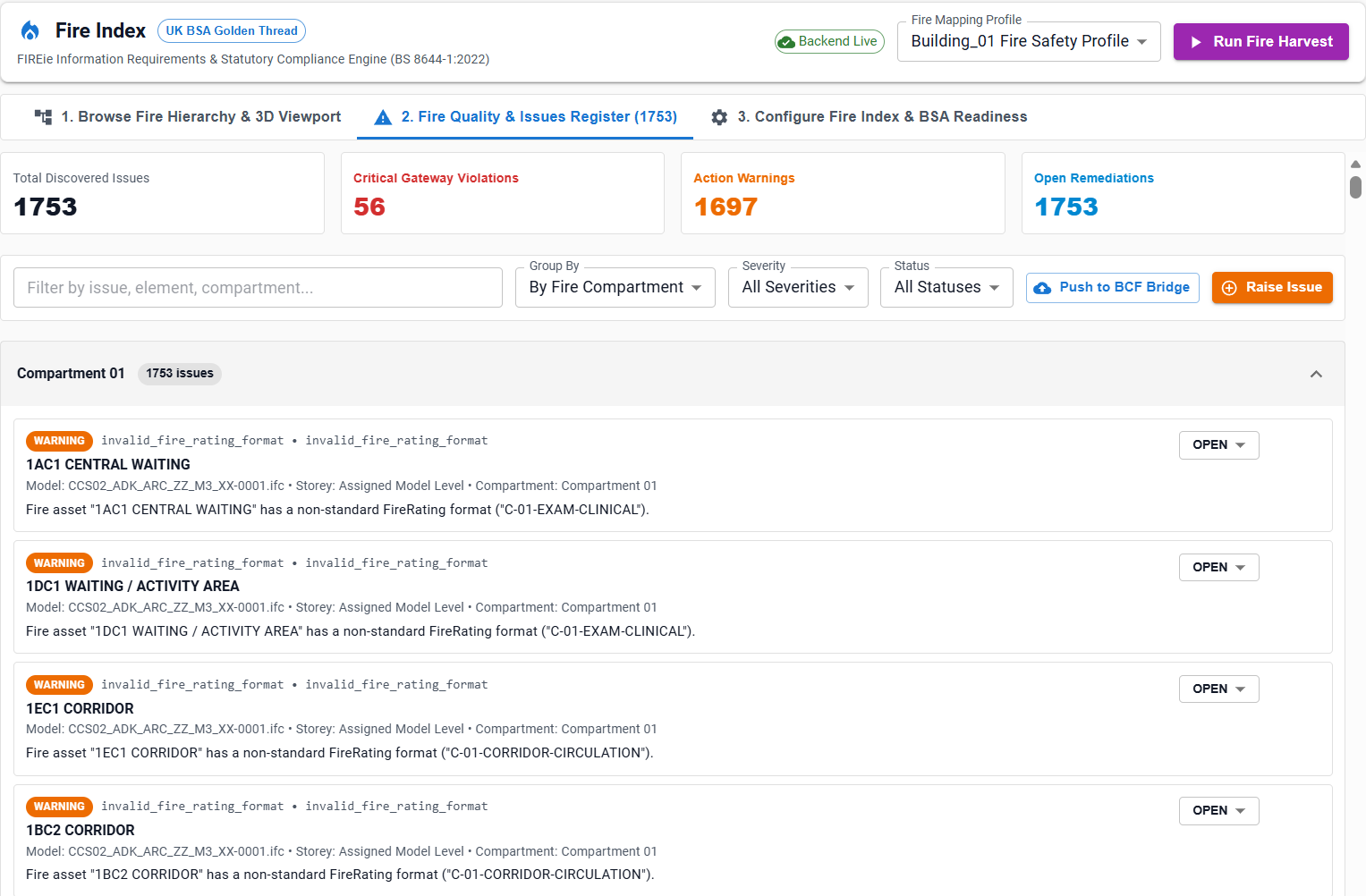
The register surfaces anomalies automatically detected during the Fire Harvesting Pipeline as well as issues raised interactively by users in the 3D viewer.
Key Register Metrics:
- Critical Issues Count: Highlights high-risk statutory violations that would fail Gateway 2 (Building Control approval) or Gateway 3 (Pre-Occupation certification).
- Warning Count: Ambiguous naming, non-standard rating formats, or cross-model metadata conflicts.
- Golden Thread Gaps: Assets missing third-party test certificates, certifier bodies, or installer accreditations.
Statutory Anomaly Categories
The validation engine evaluates elements against BS 8644-1 rules and assigns standardized issue codes:
| Issue Type Code | Severity | Description | Statutory Risk |
|---|---|---|---|
missing_fire_rating |
CRITICAL (Red) |
Element is classified as a fire doorset, damper, or compartment wall, but its FireRating attribute is completely empty, null, or blank. |
Gateway 2 rejection; high life safety hazard. |
invalid_fire_rating_format |
WARNING (Orange) |
A rating is present but uses ambiguous notation (e.g. "60 mins", "1 hr", "standard") rather than verified BS/EN codes (FD60S, EI 60). |
Ambiguity during fire compartmentation audit and procurement. |
placeholder_asset_id |
WARNING (Orange) |
Component identifier is placeholder text such as TBC, TBD, TEMP, or unassigned blank string. |
Golden Thread asset traceability broken across lifecycle. |
compartment_mismatch |
WARNING (Orange) |
Fire-rated element is located outside any recognized fire compartment boundary or escape corridor. | Fire strategy drawing and BIM model spatial misalignment. |
conflicting_cross_imodel_metadata |
WARNING (Orange) |
The same physical element has differing ratings between federated models (e.g. FD30 in Architecture model vs FD60S in Fire Strategy model). |
Federated model discrepancy causing procurement errors. |
missing_golden_thread_provenance |
INFO (Blue) |
Asset has a verified rating but lacks test certificate reference or accredited installer ID. | Gateway 3 pre-occupation compliance gap. |
Issues Register Columns & Actions
The issues table provides rich metadata and inline actions for each anomaly:
- Severity Badge: Color-coded pill (
CRITICAL,WARNING,INFO). - Issue Type: Standardized issue code with hover tooltips explaining statutory implications.
- Target Element: Formatted
ECInstanceId(e.g.0x200000014a1) with clickable copy button. - Description: Clear, plain-language narrative explaining the failure (e.g. Fire asset "Internal Door 102" is marked as fire-relevant but has an empty or missing FireRating.).
- Location & Compartment: Spatial breadcrumb indicating Storey and Fire Compartment.
- Actions:
- View in 3D: Direct camera fly-to framing the defective element in the 3D viewport.
- Raise BCF Topic: Converts the anomaly into an open BCF 2.1/3.0 issue.
- Update Status: Set issue lifecycle state (
OPEN,IN_REVIEW,RESOLVED,IGNORED).
BCF 2.1 / 3.0 Integration & OpenBIM Collaboration
The Fire Quality Register features native integration with the Building Collaboration Format (BCF):
- 1-Click Issue Creation: Selecting Raise Fire Issue from the register or the Asset Inspection Drawer creates a structured BCF topic.
- Synchronized 3D Viewpoint:
- Automatically captures the 3D camera position, target vector, and field of view.
- Generates a lightweight PNG viewport snapshot.
- Records the selected element GUID and isolates surrounding context.
- Export & Sync: Topics can be exported as
.bcfziparchives or synchronized in real time with cloud BCF servers (e.g. OpenProject, BIMcollab, Revizto).
Remediating Issues
Workflow:
- Filter by Critical: Use the severity filter to display all
missing_fire_ratingelements. - Export Remediation Schedule: Export the table to CSV/Excel for dissemination to the lead architectural or MEP design team.
- Model Update & Re-Harvest: Once the authoring BIM files (Revit/IFC) are updated and published to the iTwin, select Run Fire Harvest.
- Automated Reconciliation: The harvesting engine re-evaluates all elements; resolved items are automatically marked as
RESOLVED.