Fire Index — Configure Fire Safety Profiles & Golden Thread Mapping Rules
The Configure Fire Index & BSA Readiness interface allows fire safety officers, BIM managers, and principal designers to author, customize, and validate fire safety classification rules. It bridges heterogeneous BIM authoring conventions (Revit Shared Parameters, IFC Property Sets, dynamic JSON attributes) into a standardized, statutory Golden Thread dataset.
Configuration Overview
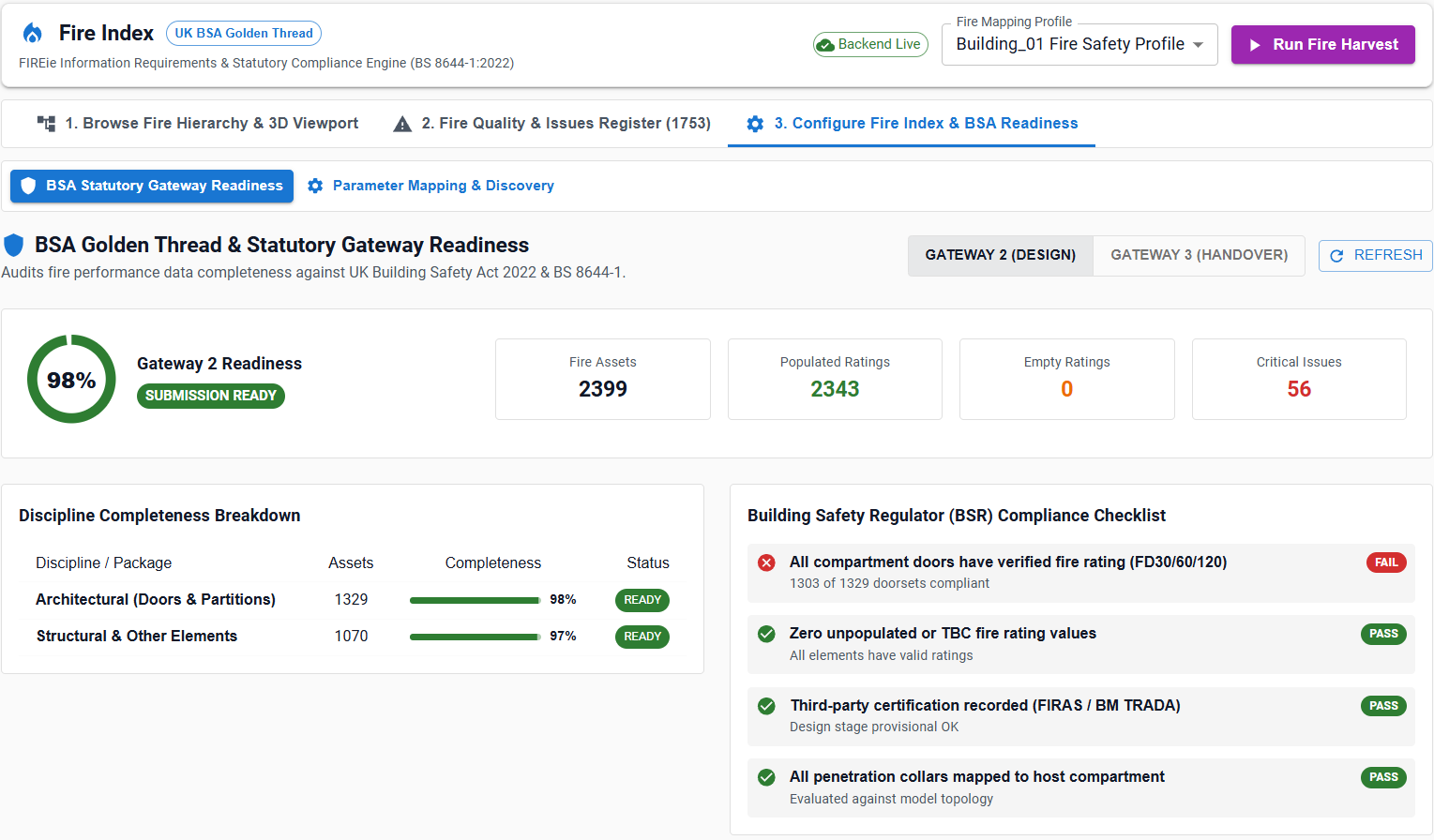
Every project or iModel can bind to one or more Fire Safety Profiles. A profile establishes:
- Target Statutory Gateway: Determines compliance stringency (
GW2Planning / Building Control approval orGW3Pre-Occupation handover). - Regulatory Jurisdiction: Ruleset enforcement (e.g.
UK_BSR,BS_8644-1:2022,EN_13501-2,HTM 05-02Healthcare). - Target ECClasses: Selects geometric and spatial classes evaluated during extraction (e.g.
bis.GeometricElement3d,architecturalphysical.door,revitdynamic.doors). - Property Discovery & Slot Mappings: Binds raw BIM property paths to canonical Golden Thread fields.
- Validation Regex Rules: Enforces strict format validation for fire resistance ratings, integrity/insulation durations, and certificate identifiers.
Statutory Gateways and Jurisdiction Presets
The profile builder provides built-in statutory templates configured for the UK Building Safety Act:
| Preset Profile | Target Gateway | Target Jurisdiction | Mandatory Requirements |
|---|---|---|---|
| UK BSA Golden Thread & BS 8644-1 Standard | GW2 (Gateway 2) |
UK_BSR |
FireRating required on all fire doors, compartment partitions, and fire dampers; basic classification code required. |
| Pre-Occupation Handover (Gateway 3) | GW3 (Gateway 3) |
UK_BSR |
Full Golden Thread provenance mandatory: Test Certificate Number, Third-party Certifier, Installer accreditation (e.g. FIRAS), and As-Built compartment zone. |
| European Performance Standard | GW2 |
EN_13501-2 |
EN classifications enforced (EI 30, EI 60, REI 120, E 90). |
| Healthcare Specialised Safety | GW2 |
HTM_05_02 |
Stricter smoke seal verification (Sa / Sm) and progressive horizontal evacuation compartment boundaries. |
Dynamic Property Discovery
Different CAD/BIM authoring software stores fire safety attributes under diverse property schemas. The Schema Property Discovery Engine automatically queries the active iModel for available fire-relevant properties:
- Revit Dynamic Properties:
RevitDynamic.Doors_Single_Flush_FD60S→Fire_Rating,Fire_ResistanceParameter.Door_FireRating
- IFC / OpenBIM Property Sets:
Pset_DoorCommon.FireRatingPset_BuildingElementProxyCommon.FireResistanceRating
- Custom Dynamic JSON Attributes:
$->FIREie__x002E__Type__x002E__ResistanceToFireRequiredInsulation$->FIREie__x002E__Type__x002E__ResistanceToFireRequiredIntegrity
Users can search for properties across the model schema and click + Add to Profile to create a mapping slot.
Canonical Slot Mappings
Raw BIM properties are normalized into standardized canonical slots used by the Fire Breakdown Structure and 3D Viewport:
| Canonical Slot | Data Type | Description | Example Target Values |
|---|---|---|---|
FIRE_RATING |
String | Overall fire resistance duration and rating code. | FD30, FD60S, EI 60, REI 120 |
INTEGRITY_MINUTES |
Integer | Period in minutes component resists fire penetration (E). | 30, 60, 90, 120 |
INSULATION_MINUTES |
Integer | Period in minutes thermal insulation is maintained (I). | 30, 60, 120 |
SMOKE_RATING |
String | Smoke containment performance (S or Sa / Sm). | Sa, Sm, S |
COMPARTMENT_ID |
String | Identifier of containing fire compartment or zone. | C-01-CORRIDOR, FZ-LEVEL02-NORTH |
BOUNDARY_ELEMENT |
Boolean | Declares whether element forms a compartment boundary wall or floor. | TRUE, FALSE |
CERTIFICATE_REF |
String | Test certification reference or Golden Thread identifier. | CERTIFIRE-CF12345, BM-TRADA-5678 |
INSTALLER_ID |
String | Accredited contractor or installation sign-off identifier. | FIRAS-REG-99120 |
Regular Expression Validation Rules
Profiles allow defining custom regex patterns to detect malformed or ambiguous fire ratings:
{
  "sourceProperty": "FIREie__x002E__Type__x002E__ResistanceToFireRequiredInsulation",
  "propertyLabel": "Resistance To Fire Required Insulation",
  "targetCanonicalSlot": "FIRE_RATING",
  "requiredForGateway": true,
  "validationPattern": "^(FD\\s?(?:30|60|90|120)(?:S)?|(?:R)?EI\\s?\\d+|E\\s?\\d+|\\d+)quot;
}
Validation Outcomes:
- Pass (
COMPLIANT): Values likeFD60S,EI 60,FD30,120are recognized and colored accurately in 3D. - Warning (
invalid_fire_rating_format): Ambiguous text like"60 mins","1 hour","standard"triggers a quality issue in the register for authoring remediation. - Critical (
missing_fire_rating): Fire doorsets or partitions with empty, blank, orTBCratings are flagged as high-risk statutory violations.
Saving and Switching Profiles
- Active Profile Selector: The upper-right profile selector in the top bar (
UK BSA Golden Thread & BS 8644-1 Standard) allows switching profiles on the fly. - Persisted Configurations: All profiles are saved to the backend validation database via
POST /api/fire/configsand isolated byiTwinIdand project domain. - Instant Re-Evaluation: Selecting a different profile immediately recalculates compliance metrics across the browser tree and 3D heatmap without requiring a full re-harvest.