Class Index — View
The View tab is where you calculate, inspect, and publish Class Index results for the selected iTwin, iModel, ChangeSet, and configuration. It provides an immediate visual assessment of data completeness across all 3D geometric classes and aspects, broken down by model file.
Before you start
Ensure the following are selected in the page context and toolbar:
- iTwin and iModel: The target digital twin container.
- ChangeSet: The specific revision of the iModel to be evaluated.
- Config: The active Class Index configuration containing your class, aspect, and property mapping rules.
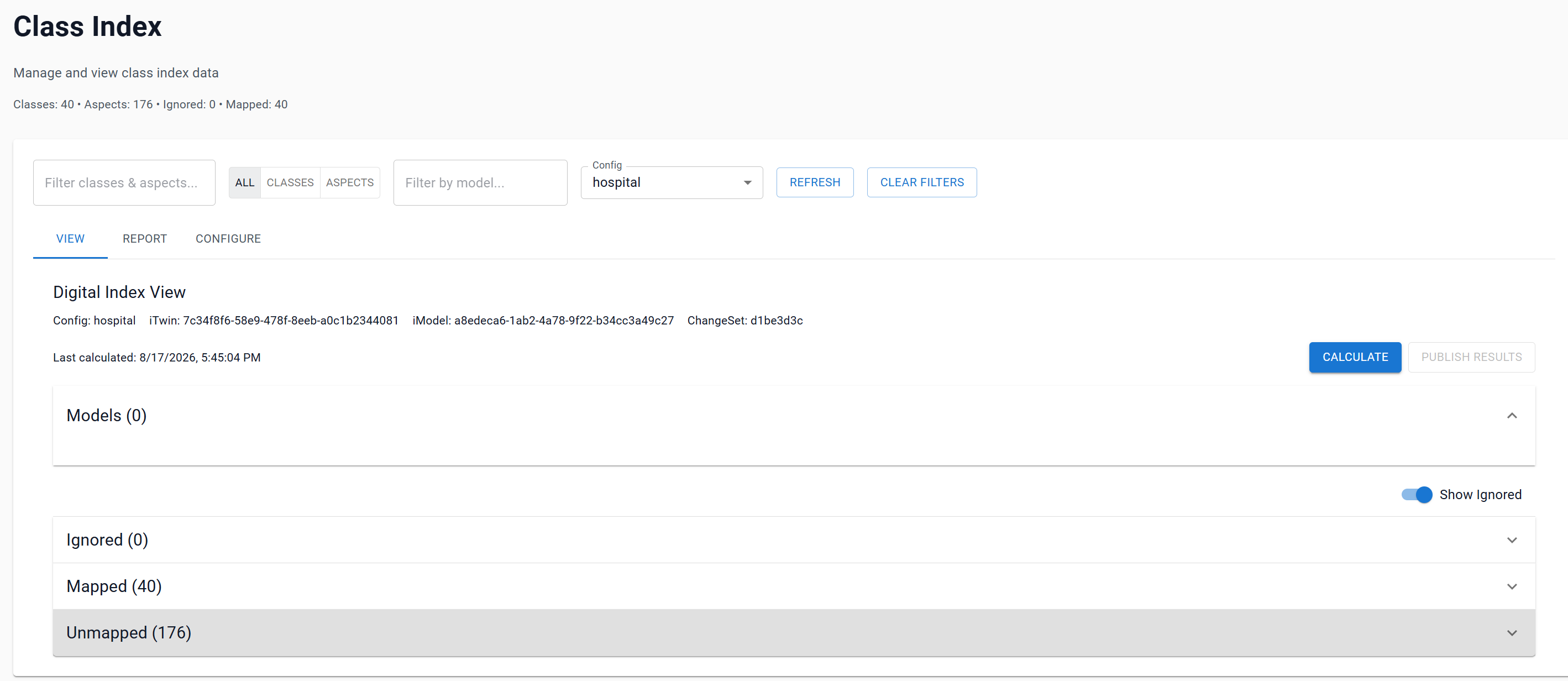
Toolbar and page filters
The toolbar controls allow you to filter and focus your inspection:
| Control | Description |
|---|---|
| Filter classes & aspects | Searches class and aspect names. |
Type toggle (All / Classes / Aspects) |
Isolates 3D geometric classes (Classes) or metadata aspects (Aspects). |
| Filter by model | Limits results to items belonging to models matching the filter text. |
| Config | Selects the active configuration used for calculation. |
| Refresh | Reloads inventory and results for the current context. |
| Clear Filters | Resets all active search and filter controls. |
Calculating a Class Index
- Open the View tab.
- Verify that your desired Config, iTwin, iModel, and ChangeSet are selected.
- Select Calculate.
- The button displays real-time progress (
Calculating… (processed/total)). As each class or aspect is queried, its individual score and contributing model metrics update dynamically.
Result summary
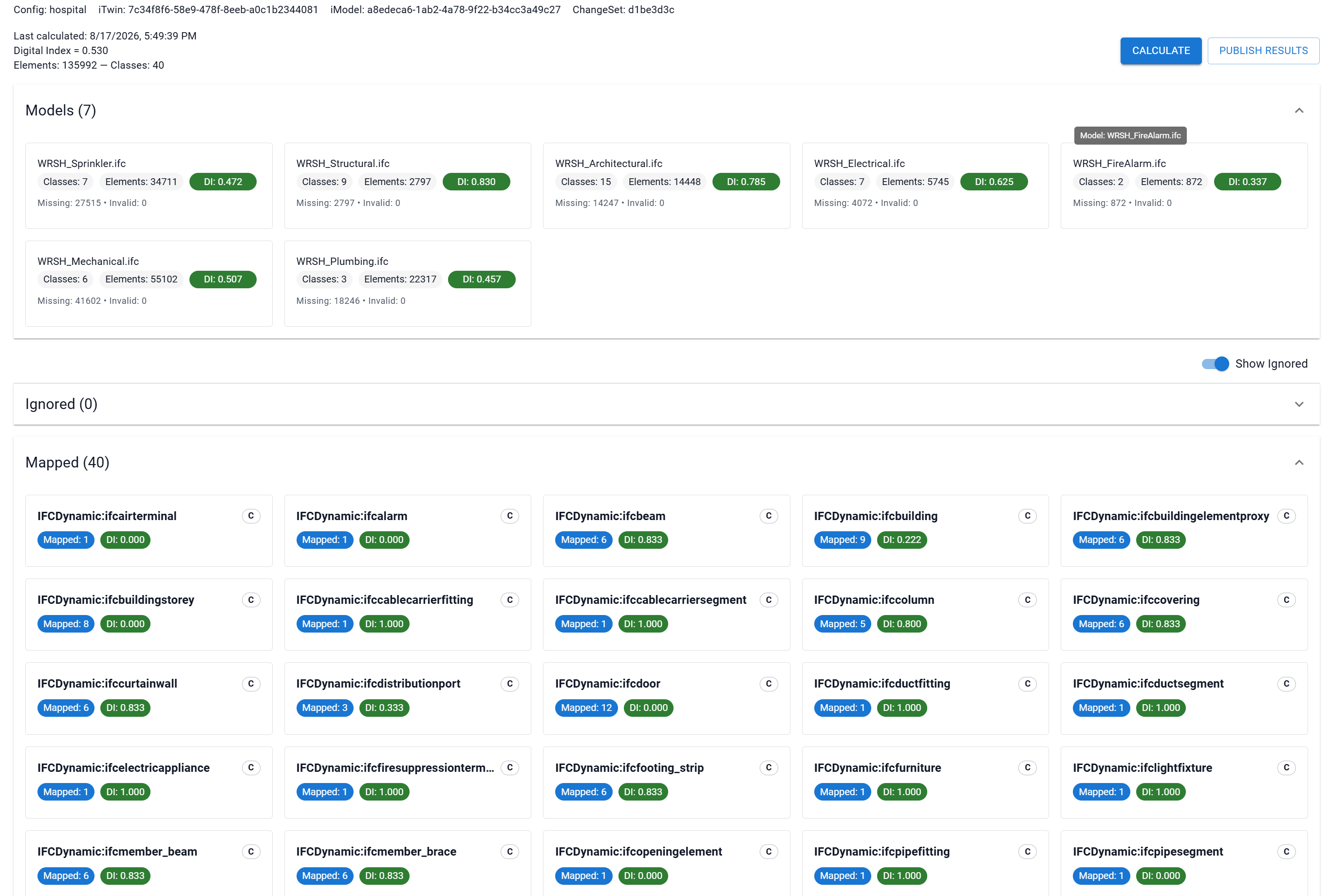
Once calculation completes, the summary bar displays:
- Last calculated: Date and time the current calculation was performed.
- Digital Index: Overall element-weighted score (e.g.
Digital Index = 0.850), reflecting total property completeness across all evaluated elements. - Elements: Total count of evaluated 3D element instances and aspect-bearing elements.
- Classes: Total number of evaluated classes and aspects.
[!NOTE] If results have not been calculated for the current context, the summary indicates
No calculation results available. Select Calculate to generate fresh scores.
Models section
The Models accordion (expanded by default) provides an aggregated quality breakdown for each contributing model file in the iModel:
Each model card displays:
- Model Name: Human-readable name of the design model.
- Classes: Number of contributing classes/aspects within the model.
- Elements: Total count of elements belonging to the model.
- DI (Digital Index): Element-weighted data quality score for that specific model.
- Missing / Invalid: Counts of missing and invalid property values across the model.

[!TIP] Use the Filter by model input in the toolbar to isolate a single discipline model (e.g., architectural, structural, or MEP).
Classes and Aspects inventory
The lower section organizes all items into three categorized accordions:
Visual identification chips
[C](Outlined Chip): Physical 3D Geometric Class (bis.geometricelement3d).[A](Filled Purple Chip): Non-geometric Metadata Aspect (ElementMultiAspectorElementUniqueAspect).
1. Ignored
- Contains all classes and aspects excluded by the active configuration.
- Displays class/aspect name,
[A]/[C]badge, and total element count. - Can be hidden or shown using the Show Ignored toggle switch above the section.
2. Mapped
- Lists all included classes and aspects with active property requirements.
- Card displays:
- Item name with full hover tooltip.
[A]/[C]type chip.- Mapped: X: Number of required properties evaluated.
- DI: X.XXX: Individual Digital Index score for this class/aspect.
3. Unmapped
- Lists included classes and aspects that currently have no required properties configured.
- Card displays item name,
[A]/[C]badge, and Props: X (total available properties in schema).
Publishing results
Selecting Publish Results saves the locally calculated results to the central reporting store, enabling cross-changeset trend analysis in the Report tab.
Publishing requirements
Publishing is enabled only when all of the following conditions are met:
- You possess the Author role/entitlement.
- A calculation has been completed in the current browser session.
- The selected Config, iTwin, iModel, and ChangeSet IDs match the calculated result.
- The result has not already been published in this session.
[!IMPORTANT] When you load an existing result from storage, the button is disabled to prevent duplicate writes. To create a new revision, select Calculate to rerun the evaluation, then select Publish Results.
Upon successful publication, the button status updates to Published.
Troubleshooting
| Symptom | Cause / Check |
|---|---|
| Calculate button is disabled | Verify that an iTwin, an iModel, a ChangeSet, and a Config are all actively selected in the context header. |
| Publish Results button is disabled | Confirm that you have run Calculate in the current session, hold the Author entitlement, and have not already published the result. |
| Expected model or class does not appear | Check the toolbar filters (clear search text, reset type toggle to All, and clear model filter). If still missing, check the Configure tab to confirm the class is not marked as Ignored. |
| Calculation reports an error for a class | The class or aspect may have schema inconsistencies or missing properties in the specific ChangeSet. Select Refresh and verify the configuration. |