Data Quality & Issues Register — BCF Integration & Flexible Grouping
The Data Quality & Issues Register (Tab 3 of the Asset Index or via the /issues route) elevates model validation from passive anomaly logging into a first-class, collaboration-grade issue management system.
Through an integrated Flexible Grouping Engine and BCF (BIM Collaboration Format) Bridge, engineering coordinators and information managers can organize, triage, assign, and publish data quality anomalies directly to OpenProject (https://opencde.itwin.app), Trimble Connect, or any OpenCDE-compliant BCF server.
Key Capabilities
- Flexible Group-by Engine: Group issues dynamically by Model Name, Level / Storey, Severity, Discipline, ECClass, Status, or user-defined dot-paths (e.g.
properties.ZoneCode) without altering underlying asset data. - OpenProject & OpenCDE BCF Bridge: Push individual issues or batch-publish open issues as standard BCF 2.1 / 3.0 topics to
https://opencde.itwin.appor custom Bring-Your-Own (BYO) endpoints. - Deep-Link Work Package Badges: Issues published to OpenProject render direct deep-link badges (
[ 🔗 #123 ↗ ]) opening the exact work package in OpenProject in a new tab. - Live Bidirectional Mutation Synchronization: Edit status (
OPEN,IN_REVIEW,RESOLVED,IGNORED), assign issues to team members, and adjust due dates with immediate upstream synchronization to OpenProject. - Ring-Fenced JIT Access Security: Private iTwin security (
public: false) ensures project data confidentiality while providing Just-In-Time (JIT) membership provisioning for authenticated iTwin users. - Offline BCF-XML Export: Export issues as standard
.bcfzip/.bcfxmlarchives for offline review in Solibri, Autodesk Revit, ArchiCAD, or Navisworks.
1. Navigating the Issues Register
Open Asset Index in the main navigation and select Data Quality & Issues Register (Tab 3 in the header), or navigate directly to Issues Register in the sidebar.
Toolbar Controls
| Control | Description |
|---|---|
| Group Issues By | Select a predefined grouping strategy or define a custom dot-path. |
| Severity Filter | Filter issues by CRITICAL, WARNING, INFO, or All Severities. |
| Status Filter | Filter issues by OPEN, IN_REVIEW, RESOLVED, IGNORED, or All Statuses. |
| Search Filter | Live keyword search across target elements, descriptions, classes, models, and assignees. |
| Expand / Collapse All | Toggle visibility of all group accordions across the register. |
| Sync BCF | Query OpenProject and reconcile external status updates back into local issues. |
| OpenProject CDE | Quick-launch portal button to open the OpenProject CDE in a new tab with JIT membership assurance. |
| Export BCF | Download BCF-XML markup bundle (.bcfzip) for offline tool consumption. |
| Push Open to BCF | Batch publish all unresolved open issues to the configured BCF endpoint. |
2. Flexible Grouping Strategies
The grouping engine allows dynamic multi-level organization of harvested issues:
▼ Architectural Model (12 issues) [3 CRITICAL] [8 WARN] [1 INFO] [12 Open]
  ▼ Level 1 (7 issues) [2 CRITICAL] [5 WARN]
    CRITICAL | MISSING_CLASSIFICATION | SAN-WC-L1-148 | Open   | [ 🔗 #40 ↗ ]
    WARNING  | REQUIRED_BUT_BLANK     | SAN-SK-L1-148 | Review | [ 🔗 #41 ↗ ]
  ► Level 2 (5 issues)
► Structural Model (3 issues)
► MEP Model (8 issues)
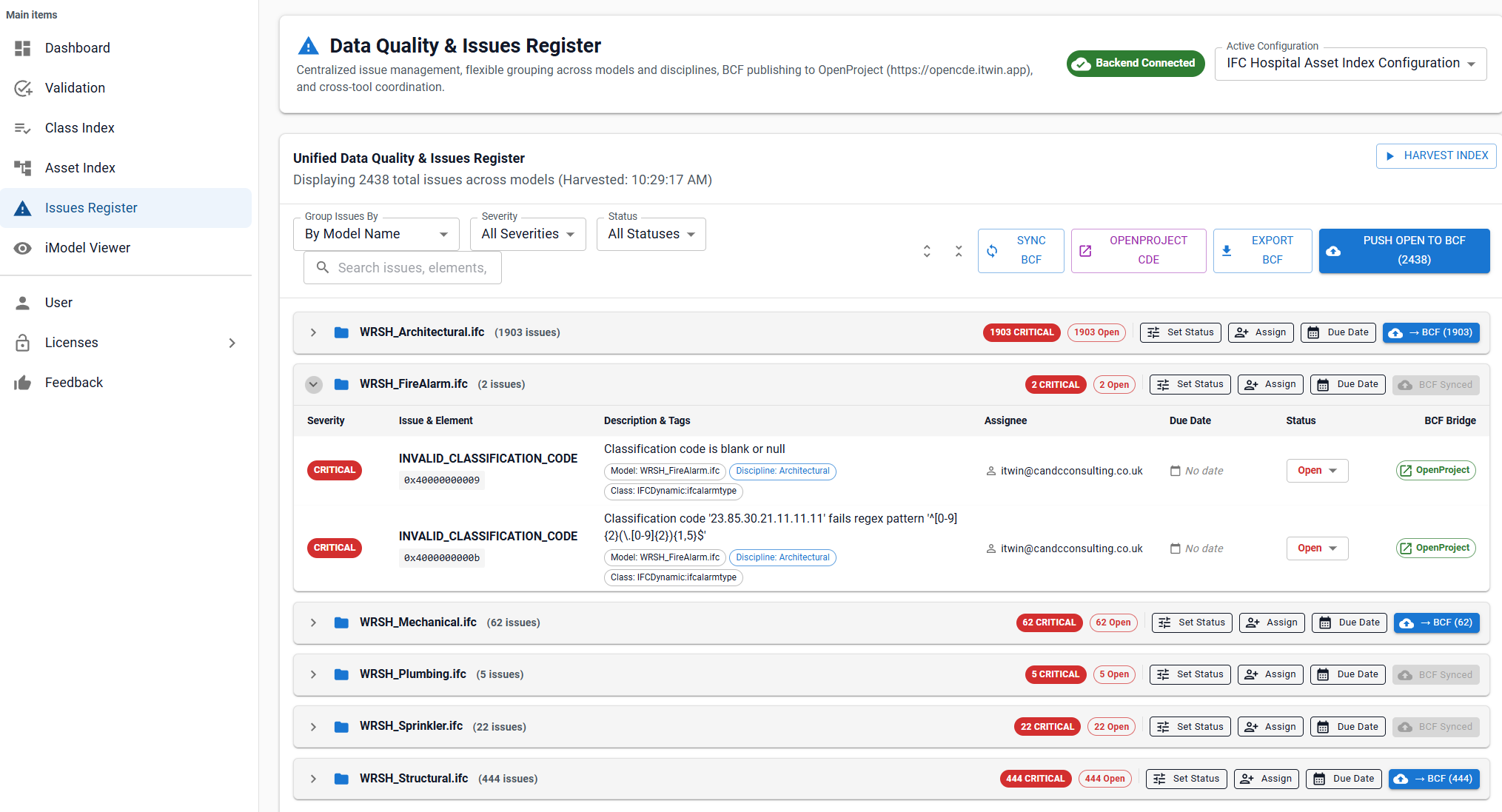
Predefined Strategies
- By Model Name (
modelName): Separates issues by federated model partition (e.g. Architectural, Structural, MEP). - By Level / Storey (
storey.name): Groups issues by building level or storey for spatial floor-by-floor remediation. - By Severity (
severity): Triage critical compliance failures first (CRITICAL,WARNING,INFO). - By Issue Type (
issueType): Group by root cause (e.g.MISSING_CLASSIFICATION,REQUIRED_BUT_BLANK,DUPLICATE_LOCATION). - By Discipline (
discipline): Inferred from component schemas (Mechanical, Electrical, Structural, Architectural). - By Model then Level (
['modelName', 'storey.name']): Multi-tier hierarchical nesting.
Custom Grouping
To group by custom element properties or metadata:
- Select Custom Field Path... from the Group Issues By dropdown.
- Enter the dot-notation path (e.g.
properties.ZoneCodeorspace.name). - Enter custom group and fallback labels.
- Select Apply Grouping.
Group-Level Batch Operations
Each group accordion header provides bulk operations that apply to all issues within the group (including nested sub-groups):
| Group Action | Description |
|---|---|
| Set Status | Dropdown menu allowing coordinators to set all issues in the group to OPEN, IN_REVIEW, RESOLVED, or IGNORED simultaneously. |
| Assign | Dialog allowing assignment of all issues in the group to a team member email (e.g. engineer@contractor.com) with automated OpenProject account activation. |
| Due Date | Date picker dialog setting a synchronized resolution deadline across all issues in the group. |
| → BCF (${unpushedCount}) | Batch publishes only the unlinked open issues within this specific group to OpenProject. |
| BCF Synced (Re-sync) | Re-triggers an immediate upstream synchronization for all issues in the group. |
3. BCF Bridge Architecture & Security
Digital Index implements a zero-token-burden architecture:
Security & Privacy Features
- Server-Side Token Isolation: Digital Index users never handle or store OpenProject API keys in their browser. All requests route through
/api/bcf-bridge/[iTwinId]/topics, injecting the service bot key on the backend. - Private Ring-Fenced Projects (
public: false): Auto-created projects in OpenProject are strictly private. Only explicit project members can view project data or work packages. - Just-In-Time (JIT) Least-Privilege Provisioning:
- Authenticated iTwin users clicking
[ 🔗 #123 ↗ ]or[ ↗ OpenProject CDE ]have their standardMemberrole (ID 4) verified in that private project just-in-time. - Assigned collaborators receive standard non-admin
Memberpermissions strictly confined to that single project.
- Authenticated iTwin users clicking
- No Admin Rights for End Users: All auto-provisioned users are created with standard non-administrator privileges (
admin: false).
4. BCF Collaboration Workflow
Pushing an Issue to OpenProject
- Locate the issue in the register.
- Select the → BCF button on the right side of the row.
- The bridge formats the issue into a BCF topic and OpenProject Work Package including:
- Issue title, severity, ECClass, and description.
- Rich attribution metadata (
[Published by: user@domain]). - Storey, Space, and Model context.
- Once created, the button transforms into a green
[ 🔗 #40 ↗ ]badge linking directly to the work package.
Batch Push
Select Push Open to BCF in the toolbar to batch-upload all unlinked open issues across all groups.
Exporting BCF-XML
Select Export BCF to download a standard .bcfzip archive containing topic markups and version manifests ready for import into Solibri, Revit BCF Manager, Navisworks, or Trimble Connect.
5. Entitlements & Permissions
| Action | Required Entitlement | Scope |
|---|---|---|
| Browse & Filter Issues | Free / Access | Read-only register inspection |
| Inline Status & Assignee Triage | Free / Access | Local & live synced mutations |
| Export BCF-XML | Free / Access | Offline .bcfzip export |
| Push Issues to OpenProject / BCF | Publish | Live upstream issue publishing |
| Configure BCF Bridge Settings | Author | Editing BCF endpoints & field mappings |